Deer Head Illustrations That Actually Work for Your Projects
You have probably seen a deer head graphic somewhere recently. Maybe on a craft beer label, a boutique coffee bag, a podcast cover, or the logo of an outdoor gear brand. There is a reason this motif keeps showing up. It carries a quiet strength, a connection to nature, and a sense of timelessness that few other symbols can match. But finding a version that does not look cheap, overused, or impossible to edit can be frustrating. That is where a well-crafted AI EPS illustration set changes everything.
This collection is built for people who actually need to use the artwork, not just admire it on a screen. Whether you are designing merchandise, building a brand identity, or putting together educational materials, the difference between a generic clip-art deer and a professionally structured vector file becomes obvious within minutes of opening it.
What Exactly Is This Deer Head Illustration Collection
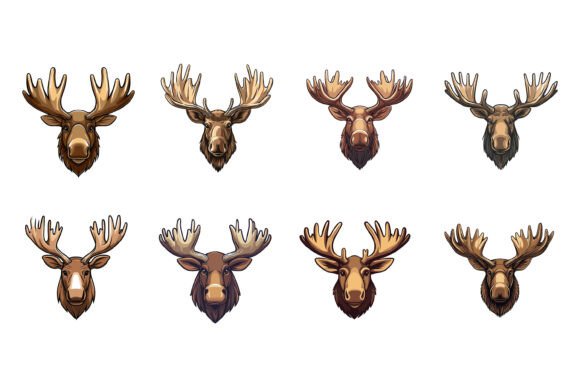
At its core, this is a set of vector-based deer head illustrations delivered in AI and EPS formats, with JPG previews included. But that description misses what matters. These are not flattened, single-layer images that fight you when you try to make changes. They arrive with a neatly organized file and layer structure, which means you can isolate the antlers, adjust the facial contours, tweak the color of every element, or remove details without starting over from scratch.
The illustrations are designed with consistency in mind. Every curve, every anchor point, every proportion has been refined so the deer head reads clearly at any size — from a tiny app icon to a large-format print. For Mac and Windows users alike, the files open cleanly in Adobe Illustrator, Affinity Designer, CorelDRAW, and other mainstream vector editing software.
Where a Versatile Deer Head Graphic Earns Its Keep
People often buy an illustration set with one specific project in mind, then discover it fits into a dozen other places they had not considered. A deer head graphic has surprising range. Here are some of the most common scenarios where this kind of asset becomes genuinely useful.
Branding for Outdoor, Lifestyle, and Craft Businesses
Small business owners in the outdoor, hunting, camping, and artisanal food spaces frequently reach for deer imagery. A coffee roaster in the Pacific Northwest might use a stylized deer head on their packaging to evoke forest mornings and mountain air. A craft brewery could incorporate it into a seasonal IPA label. A leather goods maker might emboss a simplified version onto wallets or journal covers. Because the vector files are fully editable, each of these businesses can adapt the same base illustration to match their specific color palette and brand personality.
Apparel and Merchandise Design
If you sell t-shirts, hoodies, hats, or tote bags, you know that artwork needs to be crisp and scalable. A raster image that looks fine on a screen can turn into a pixelated mess on fabric. The AI and EPS formats solve that problem. You can scale the deer head to fit a chest print, a sleeve patch, or a cap emblem without losing any quality. Changing the color to match different garment options is straightforward, and you can modify the illustration style — maybe you want a geometric, low-poly look for one line and a more organic, sketch-like feel for another.
Digital Content, Social Media, and Web Graphics
Content creators, bloggers, and social media managers often need custom imagery that stands apart from stock photo clichés. A well-designed deer head can anchor a quote graphic, serve as a channel mascot, or add character to a website header. The JPG previews give you quick access for mockups and fast posts, while the vector files let you create polished, on-brand assets for YouTube thumbnails, podcast cover art, or newsletter banners.
Educational and Informational Projects
Educators, textbook publishers, and wildlife organizations sometimes need clear, accurate animal illustrations. A deer head in a structured vector format can be labeled for biology worksheets, featured in conservation presentations, or printed on trail signage. The organized layer structure makes it possible to highlight certain anatomical features — isolate the antler growth pattern, for instance, or draw attention to the ear placement and eye shape. Because you control the colors and line weights, the illustration can be adapted for young students or adult learners alike.
Print Materials, Stationery, and Home Décor
Event planners designing rustic wedding invitations. Stationery shops creating custom notecards. Home décor brands printing canvas wall art. All of these use cases demand high-resolution, editable artwork. The deer head illustration can sit elegantly on a save-the-date card, add a woodland touch to a baby shower invitation, or become the focal point of a framed print in a cabin rental. The perfection in details means the illustration holds up when printed at large sizes, with no jagged edges or awkward curves to ruin the impression.
Infographics, Icons, and User Interfaces
Designers working on apps, dashboards, or infographics often need symbolic representations of wildlife, hunting zones, nature reserves, or ecological data points. A deer head icon can serve as a clean, instantly recognizable symbol in these contexts. The vector format allows you to simplify it further if needed — strip it down to a minimalist silhouette for a map legend, or keep the detailed version for a featured element in an interactive display. The consistency of the illustration set means it will look cohesive alongside other symbols you might use.
Why the Right File Format Changes How You Work
Many people do not realize how much time they waste fighting with poorly constructed files until they experience something better. The AI EPS format matters because it is the native language of professional design software. This is not a traced JPEG that falls apart when you zoom in. It is a genuine vector illustration built with clean anchor points and logical layer grouping.
When you open the file and see properly named layers — say, "antlers," "head base," "facial features," "shading" — you immediately understand how to make changes. You can recolor the deer head in seconds, not hours. You can remove the shading layer if you need a flat, two-tone version. You can isolate just the silhouette for a stamp or an engraving template. This kind of flexibility is what separates a usable design asset from a decorative but rigid image.
Practical Considerations Before You Buy
Before adding a deer head illustration set to your toolkit, think about how and where you will actually use it. Here are a few things worth considering.
- Your design software. Make sure you have access to a program that opens AI or EPS files. Adobe Illustrator is the most common, but alternatives like Affinity Designer, Inkscape, or CorelDRAW also work well.
- Your intended output. Are you going to print, screen, or both? The vector files cover all bases, but knowing your primary use helps you decide how much detail you need to keep or simplify.
- Licensing terms. Understand what the purchase allows. Can you use the illustration on products you sell? In client work? In logo designs that you transfer to someone else? Clear licensing protects your business.
- Style consistency. If you are building a brand, make sure the deer head style aligns with your other visual elements. A hyper-realistic deer might clash with a flat, modern logo suite, while a geometric one might complement it perfectly.
- Modification needs. Be honest about how much you are willing to edit. If you need a simple, ready-to-use graphic, the JPG might suffice. If you want to adapt every detail, the organized layer structure will save you significant effort.
How Different Users Put This Illustration to Work
The beauty of a well-made deer head vector is how it adapts to completely different audiences. A freelance graphic designer might use it across three client websites in a single month — changing colors and styles each time. A small business owner might build an entire product line around it, from packaging to social media assets to trade show banners. An educator might embed it in a dozen lesson materials without ever needing to touch the original file again after the initial setup.
A hobbyist crafting gifts for family might never open the AI file at all, instead printing the JPG for a scrapbooking project or a homemade candle label. Meanwhile, a tech startup building a hunting app might strip the illustration down to a clean icon set for their user interface. The same file serves all of them, not because it is mediocre at everything, but because it is structured well enough to be genuinely adaptable.
What Sets a Quality Deer Head Illustration Apart
You can find free deer clip art in seconds online. Most of it is unusable for any serious project. The lines wobble. The proportions feel wrong. The file is a flat raster image with a white background you cannot remove cleanly. The details — the shape of the eye, the angle of the ears, the texture of the fur — look amateurish up close.
A thoughtful deer head illustration lives in the opposite world. The details are intentional. The silhouette reads well even as a small icon. The antlers have structure without looking like a collection of random branches. The facial expression carries some dignity — not cartoony, not aggressively realistic, but balanced enough to work across contexts. The file organization means you spend your time designing, not cleaning up someone else's messy anchor points.
This is not about paying for something you could get for free. It is about paying to remove friction from your creative process. When you can open a file, make your changes, and export exactly what you need without troubleshooting, you stay in your creative flow. That matters more than the price difference between a free download and a professional asset.
Moving From Download to Final Product
Once you have the deer head illustration in your hands, the real work begins. Start by thinking about what you want the graphic to communicate. A muted, earthy palette suggests warmth and tradition. High-contrast black and white leans modern and bold. A soft, watercolor-like treatment feels romantic or nostalgic. The editable nature of the vector file means you can test all of these directions without commissioning new artwork each time.
Consider where your audience will encounter this image. On a phone screen, fine details might blur together, so you may want to increase contrast or simplify the design for mobile contexts. On a large print, you can lean into the details and let the intricacy of the antlers draw the eye. The same core illustration supports both approaches because you control every variable.
For those working on tight deadlines, the organized file structure is not a luxury — it is a lifeline. When a client asks for last-minute color changes or needs the artwork in a different format, you can deliver in minutes rather than rebuilding from scratch. That reliability builds trust and keeps projects moving.
The deer head illustration, when done right, earns its place in your asset library not because of what it is on its own, but because of what it lets you create. It becomes a starting point for branding, a visual anchor for content, a teaching tool, a product embellishment, and a creative springboard. The value accumulates the more you use it, across different projects and different seasons, always ready to adapt to whatever you need next.